Tips for Creating a Relaxing and Productive Home Workspace

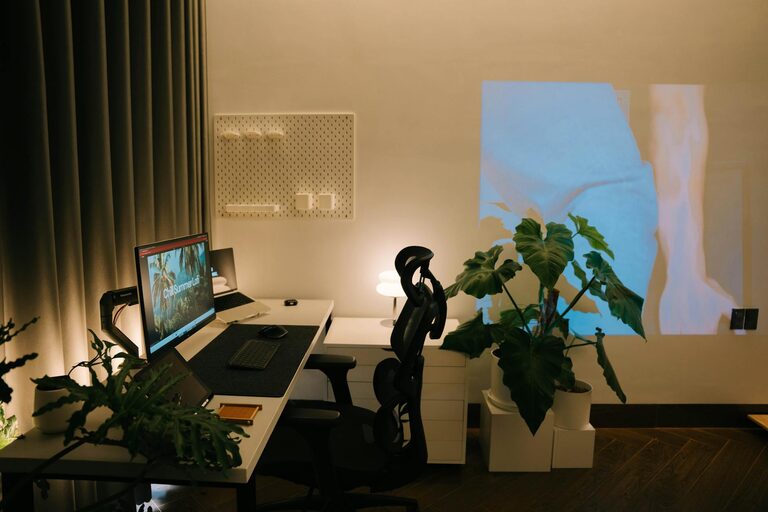
Creating a home workspace that balances productivity with relaxation is essential for making the most of your workday while maintaining your wellbeing. Whether you work remotely full-time or occasionally need a quiet area to focus, a thoughtfully designed workspace can enhance your efficiency and help reduce stress. Here are some practical tips to help you create a relaxing and productive home workspace.
Choose the Right Location
Find a Quiet Spot
Select a part of your home that is as free from distractions as possible. Ideally, this should be away from loud appliances, busy family areas, or television noise. A quiet corner or a spare room can serve as a dedicated work zone where you can focus without interruptions.
Consider Natural Light
Natural light can improve both mood and concentration. Position your desk near a window to benefit from daylight, which also helps reduce eye strain. If natural light is limited, invest in quality lighting that mimics daylight, such as daylight bulbs or adjustable desk lamps.
Invest in Comfortable and Functional Furniture
Ergonomic Chair and Desk
Comfort is key for long hours spent working. An ergonomic chair that supports your back and promotes good posture can prevent discomfort and health problems. Pair this with a desk at the correct height to keep your wrists straight as you type.
Space for Essentials
Choose a desk with enough surface area to accommodate your computer, keyboard, notepad, and any essential tools. Avoid clutter by keeping only the items you frequently use on the desk.
Create Organised Storage Solutions
Use Shelves and Drawers
Keep your workspace tidy by storing documents, stationery, and gadgets in shelves, drawers, or desk organisers. This helps clear your work surface, making it easier to concentrate.
Label and Categorise
Label boxes or files to quickly find what you need. Group similar items together to simplify access and streamline your workflow.
Personalise Your Space Thoughtfully
Add Calming Elements
Incorporate items that promote relaxation without distracting you. A small plant, a candle, or artwork can make the space feel welcoming and peaceful.
Avoid Overloading the Area
While personalising is important, too many possessions can create visual clutter. Aim for a minimalist approach that keeps your mind clear.
Manage Noise and Distractions
Noise-Cancelling Headphones
If you live in a noisy environment, noise-cancelling headphones can help you block out background sounds and improve focus.
Set Boundaries
Communicate your working hours to household members and ask for their support in maintaining a quiet environment during these times.
Use Technology to Your Advantage
Reliable Equipment
Ensure your computer, printer, and internet connection are reliable to prevent disruptions. Consider backups like portable chargers or extra cables to avoid technical difficulties.
Digital Organisation Tools
Use apps or software to manage your schedule, tasks, and projects efficiently. Tools such as calendars, to-do lists, and time trackers can help keep you on task.
Incorporate Breaks and Movement
Schedule Regular Breaks
Working non-stop can decrease productivity. Set timers to remind yourself to take short breaks, stretch, or walk around to refresh your mind and body.
Create a Break Zone
If space allows, designate an area away from your desk for relaxing during breaks. This could be a comfy chair or a spot near a window for a change of scenery.
Optimise Air Quality and Temperature
Keep a Comfortable Climate
Ensure your workspace has good ventilation and is at a comfortable temperature. Using a small fan or heater can help regulate conditions so you stay comfortable all day.
Add Air-Purifying Plants
Plants like spider plants or peace lilies help improve air quality naturally, contributing to a healthier environment.
Improve Lighting and Screen Settings
Reduce Eye Strain
Adjust your monitor brightness to match the room’s lighting. Consider screen filters or blue light glasses if you spend many hours in front of the computer.
Use Task Lighting
Position adjustable lamps to illuminate your work area directly, reducing shadows and glare.
Maintain a Positive Routine and Mindset
Start Your Day with Preparation
Organise your workspace at the end of each day so you can start fresh. Review your tasks and prioritise what needs to be completed.
Incorporate Relaxation Techniques
Use breathing exercises, short meditation breaks, or listen to calming music to maintain a relaxed state throughout the day.
—
By following these tips, you can design a home workspace that supports both your productivity and your wellbeing. A relaxing and organised environment encourages focus, reduces stress, and ultimately helps you work more effectively from home. Remember that your workspace should reflect your personal needs and preferences, so feel free to adapt these ideas to suit your lifestyle.